

Easy Module Installer for WHMCS
25% off your first order: FIRST25
Easy Module Installer is a WHMCS addon designed to simplify the installation and management of WHMCS modules. It allows you to import a module in ZIP format through a simple drag‑and‑drop action and automatically detects its category and installation directory. The system supports addons, payment gateways, registrars, provisioning modules, notifications, widgets, reports, antifraud protections, and security questions.
Before installation, the addon performs several checks to improve reliability: code security analysis, PHP version verification, Composer dependency detection, and validation of required files. It can also detect modules already installed and manage their updates.
Easy Module Installer also provides a secure uninstall feature, an installation and removal history, separate administrator permissions, and quick links to various WHMCS management sections.
A practical solution to centralize, automate, and secure WHMCS module management.
 Secure payment
 100% secure transactions
 Instant delivery
 Module available immediately after payment
 Support 7/7
 Technical support via our form
The description
Easy Module Installer is a WHMCS addon designed to significantly simplify the installation, updating, and management of WHMCS modules. It operates through an administration interface that allows uploading a .zip package and automatically analyzing its contents to determine the module type, identifier, version, author, and especially the directory where the files must be installed.
The goal of the addon is to provide an experience similar to a marketplace-style module installer, without requiring the administrator to manually extract ZIP files, search for the correct WHMCS directory, or determine the module category themselves.
Automatic Module Detection
One of Easy Module Installer’s main features is its automatic detection engine. The system analyzes the package structure as well as the PHP files inside it to identify the module category.
It can recognize:
- WHMCS Addon Modules
- Payment Gateways
- Registrar Modules
- Provisioning / Server Modules
- Notification Modules
- Dashboard Widgets
- Custom Reports
- Antifraud Modules
- Security Questions
The system uses various indicators found in the code to determine the appropriate category. When a package already contains a structure matching the WHMCS root, it can also automatically detect a complete package containing multiple components.
The addon can also handle ZIP packages from repositories or archives that include an intermediate folder before the actual module files.
Drag-and-Drop Installation
Installation is designed to be extremely simple. The administrator can drop a ZIP file directly into the WHMCS interface, and Easy Module Installer temporarily extracts its contents and performs several analyses before proposing installation.
The addon then determines the correct destination path based on the detected category. This prevents administrators from having to manually copy files into modules/addons, modules/gateways, modules/servers, modules/registrars, or other relevant directories.
The system also checks the paths used to limit directory traversal risks and prevent a ZIP package from writing outside authorized locations.
Security Analysis Before Installation
A particularly useful feature is the integrated static security scanner.
Before installation, the addon examines PHP code without executing it. It looks for potentially suspicious behaviors, including certain uses of eval(), obfuscation patterns, system command execution functions, and combinations associated with webshells or backdoors.
The scanner can also detect filenames using multiple extensions that may be used to disguise executable files.
This analysis is not an antivirus or a full security audit. It relies on heuristic rules and signatures. A clean result does not guarantee that a third‑party module is 100% safe.
When high‑risk elements are detected, installation requires explicit administrator confirmation, with server‑side verification.
Prerequisite Verification
Easy Module Installer also includes a pre‑check system for dependencies and PHP compatibility.
It looks for composer.json files inside the package, identifies declared Composer dependencies, and checks whether the package includes a vendor directory with its autoload.php file.
This helps detect a common issue: installing a source archive from GitHub that does not include required Composer dependencies.
The addon also checks the PHP version currently used by WHMCS and compares it with PHP constraints declared in Composer files when possible.
WHMCS version information is also displayed. Any WHMCS versions mentioned in the README or documentation are shown as indications, not strict blocking rules.
Update and Overwrite Management
When the addon detects that a module already exists on the server, Easy Module Installer can identify this before installation.
Depending on configuration, overwriting an existing module may be allowed or blocked. When allowed, an additional confirmation is required before replacing existing files.
This makes the addon suitable for both initial installation and updating existing modules.
Module Uninstallation
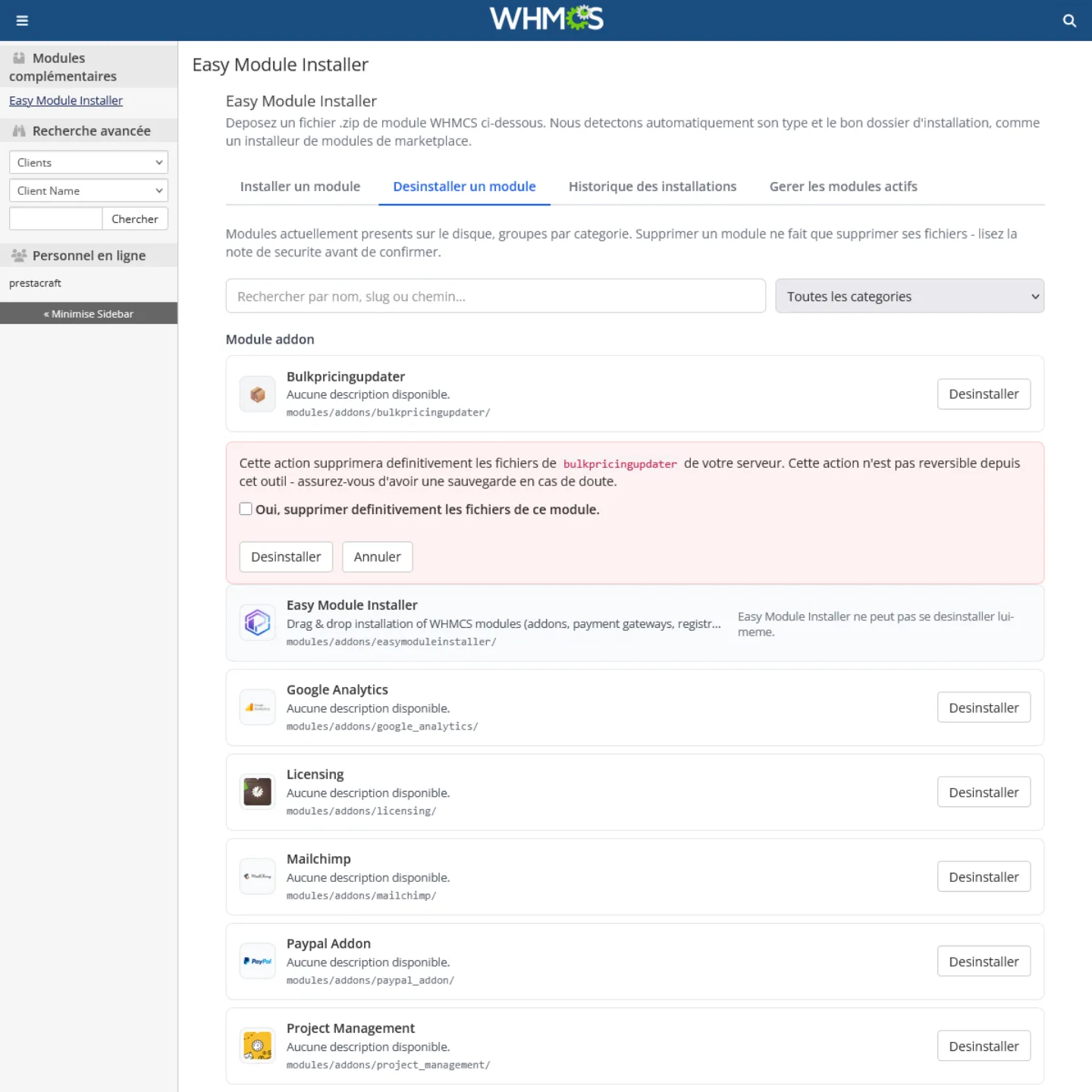
Easy Module Installer is not limited to installation. It also includes a section dedicated to uninstalling modules present on the server.
The system scans recognized WHMCS module directories and displays detected modules by category. The administrator can search for a module by name, identifier, or path, then select it for removal.
Explicit confirmation is required before deleting files.
The addon also includes protection preventing its own uninstallation from its interface, avoiding accidental removal of its required files.
Operation History
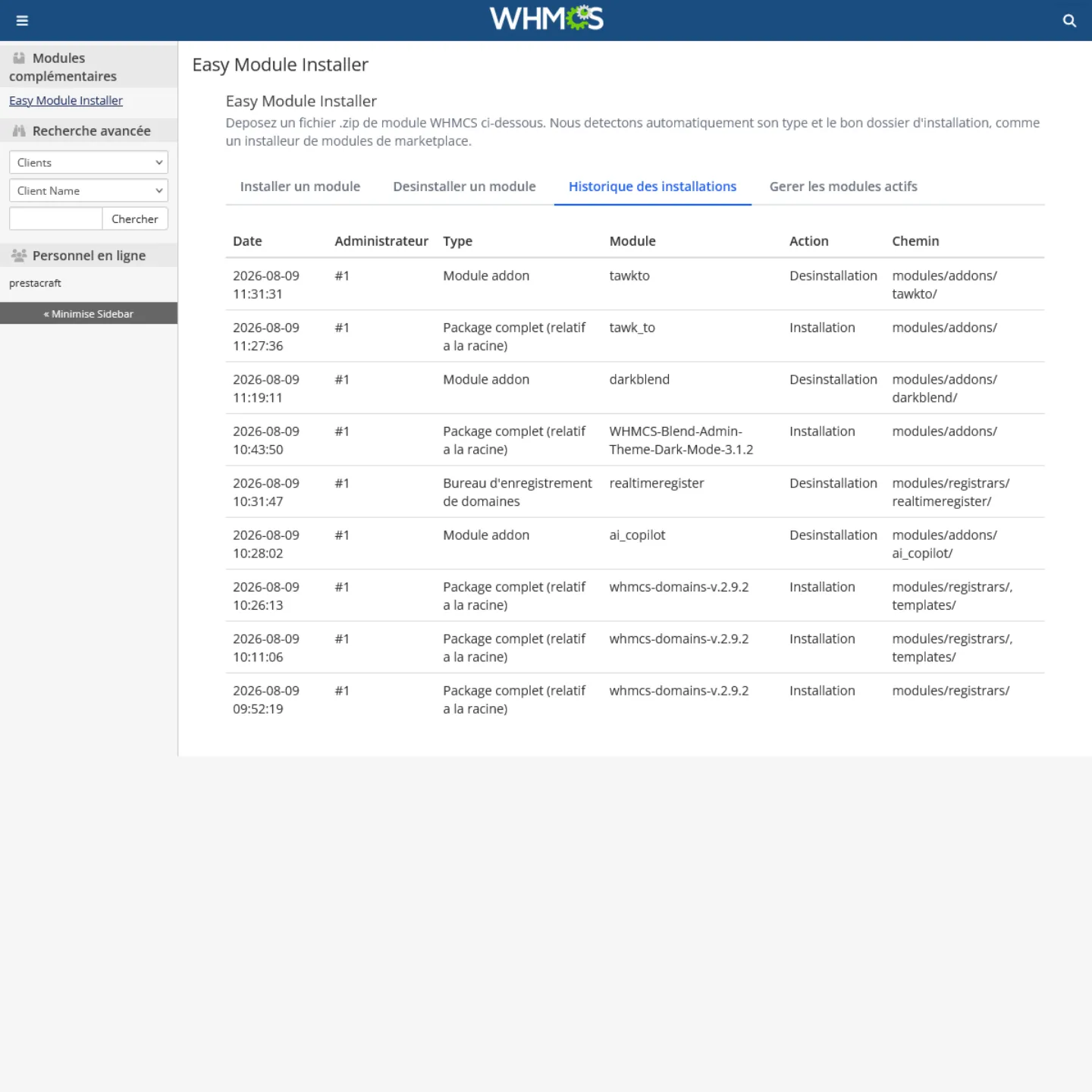
Each installation, update, or removal can be logged in a dedicated WHMCS database table.
The history records the administrator who performed the action, module type, identifier, name, version, target path, action performed, number of copied files, and IP address.
An automatic cleanup system can remove old entries after a configurable number of days. This purge can be disabled to keep the history indefinitely.
Permission Management
The addon includes two distinct WHMCS admin permissions:
- Install Modules : allows installation and updates.
- Uninstall Modules : allows module removal.
Technical Security
The addon uses CSRF protection for sensitive operations. ZIP files are placed in a temporary area and several path checks are applied.
The ZIP engine enforces limits on file count, total decompressed size, and maximum individual file size, reducing risks from oversized or malicious archives.
ZIP filenames are also checked to prevent absolute paths, directory traversal sequences, and dangerous formats.
Interface and Module Management
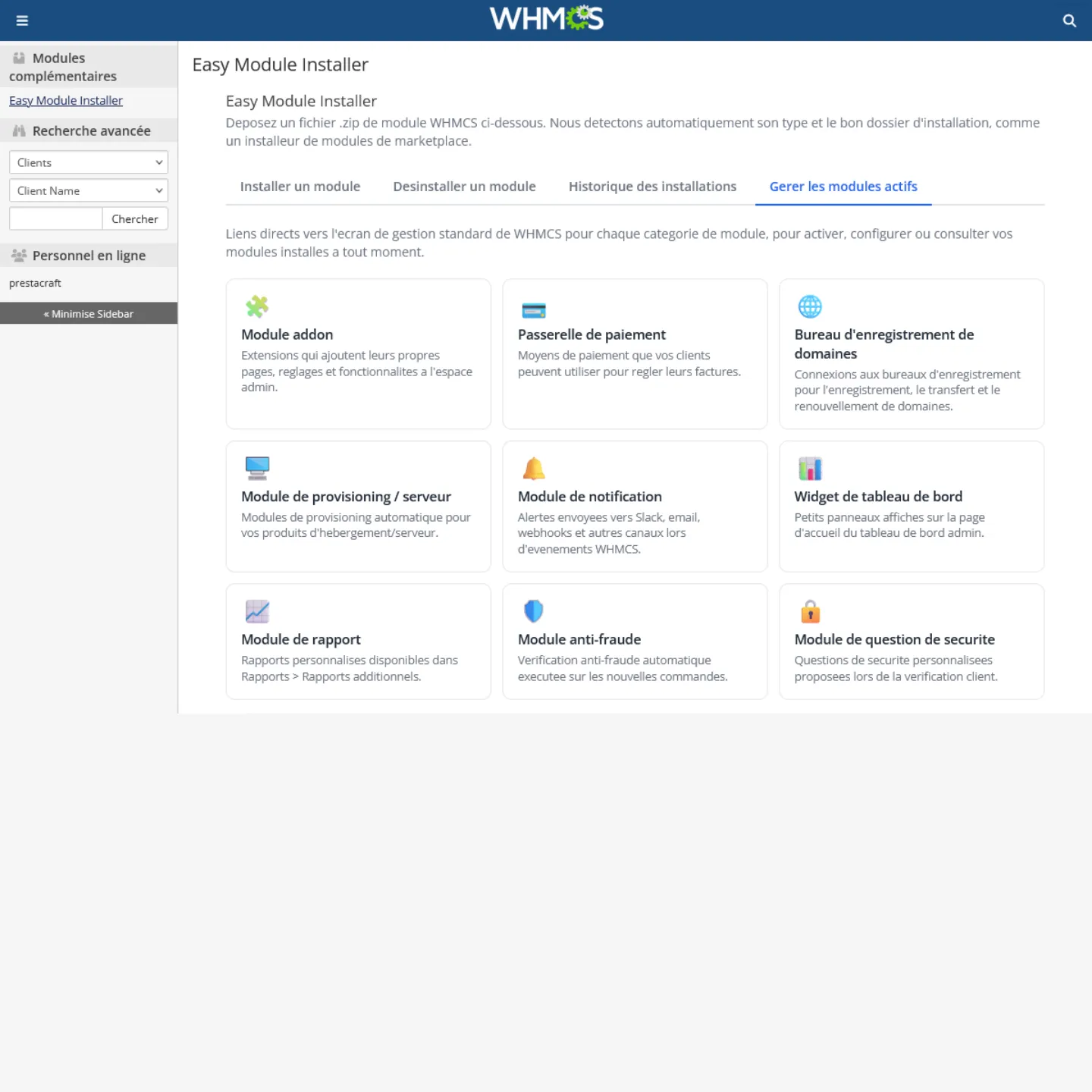
Easy Module Installer provides quick access to various WHMCS module management areas.
The system adapts to different WHMCS versions by detecting available admin pages and, for recent versions, using the Apps & Integrations sections.
The addon includes language files in French and English.
Conclusion
Easy Module Installer is far more than a simple ZIP extractor. It automates module identification, analysis, prerequisite verification, installation, updating, uninstallation, and logging.
Its main advantage is reducing technical steps while adding security and compatibility checks.
Its scanner remains a heuristic analysis and does not replace a full audit or antivirus.
Overall, Easy Module Installer is a WHMCS module installation manager focused on simplicity, automation, security, and traceability.
Technical sheet
| CMS | WHMCS |
|---|---|
| Compatibility | 8.0 9.0 |
| Language | English French |
| PHP | 7.0 |
| Category | Performance & Security |
Version history
- Ajouté WHMCS module installation system via ZIP file
- Ajouté Drag‑and‑drop to easily upload modules
- Ajouté Automatic detection of the module type
- Ajouté Automatic detection of the installation folder
- Ajouté Support for Addons modules
- Ajouté Support for payment gateways
- Ajouté Support for Registrars
- Ajouté Support for provisioning modules / servers
- Ajouté Support for notification modules
- Ajouté Support for Widgets
- Ajouté Support for Reports modules
- Ajouté Support for Anti‑Fraud modules
- Ajouté Automatic analysis of ZIP package structure
- Ajouté PHP prerequisites check
- Ajouté Detection of Composer dependencies
- Ajouté Verification of required Composer files
- Ajouté System for detecting already installed modules
- Ajouté Management of updates for existing modules
- Ajouté Uninstallation of modules from the WHMCS interface
- Ajouté History of installations and uninstallations
- Ajouté Tracking of versions and installation paths
- Ajouté Administrator permissions management
- Ajouté Integrated administration interface within WHMCS
- Sécurité Security scanner before installation
- Sécurité Detection of potentially dangerous PHP functions
- Sécurité Detection of certain obfuscated code
- Sécurité Checks for dangerous file paths within ZIP archives
- Sécurité Checks against directory traversal
- Sécurité Limits on extracted files and decompressed archives
- Sécurité CSRF protections on sensitive operations
- Sécurité Additional confirmation for high‑risk installations
- Sécurité Protections during module uninstallation
- Sécurité Protection against accidental uninstallation of the module itself
- Amélioré Optimization of automatic WHMCS module detection
- Amélioré Improved handling of complex ZIP packages
- Amélioré Improved verification of PHP compatibility
- Amélioré Improved management of Composer dependencies
- Amélioré Improved display of pre‑installation information
- Amélioré Improved module installation experience
- Amélioré Improved handling of already‑installed modules
- Amélioré Improved navigation between the module’s various functions
- Corrigé Fixes for issues related to ZIP archive extraction
- Corrigé Fixes for path‑validation issues during installation
- Corrigé Fixes for temporary‑file handling issues
- Corrigé Fixes for detection issues affecting certain module types
- Corrigé Fixes for error handling during installation operations
- Corrigé Fixes for error handling during uninstallation operations
- Corrigé Fixes for logging issues affecting operation history recording
Product Reviews / Q&A
Average rating
- Reviews (0)
- All reviews (0)
- Has image/video (0)
- Excellent (0)
- Good (0)
- Medium (0)
- Poor (0)
- Terrible (0)
- Questions & Answers (0)
- Latest
- Latest
- Oldest
- High rating
- Low rating
- Helpful
- Latest
- Latest
- Oldest
- Helpful
There are no available reviews. Write your review.
There are no available questions. Ask your question.